
A cleaner background doesn't automatically make a product photo ready for a listing. In this Toono AI test, one edit added promotional copy we hadn't requested. Another removed part of the bottle's label. A third delivered the warm beige setting we wanted, but still needed a close check of the bottle's internals.
Here are all three results, including the mistakes, and a workflow you can use to judge your own edits. Open Toono AI Image Generation to try a photo you have permission to use.
The brief: two backgrounds, one unchanged product
We wanted a white-background product image and a warm, understated promotional image from the same photograph. The bottle, cap, lettering and visible construction were supposed to stay the same.
Perfume is a useful stress test because transparent glass and shiny metal make changes easy to miss. Shopify's guide to photographing reflective products discusses the lighting and reflection problems behind this kind of product photography. Our experiment examines editing results, not sales performance or marketplace approval.
The source photograph is by Kateryna Naidenko on Pexels, used and edited under the Pexels license. It is a stock photograph, not a phone photo we took or a customer's submission. Neither the photographer nor the brand participated in this test.
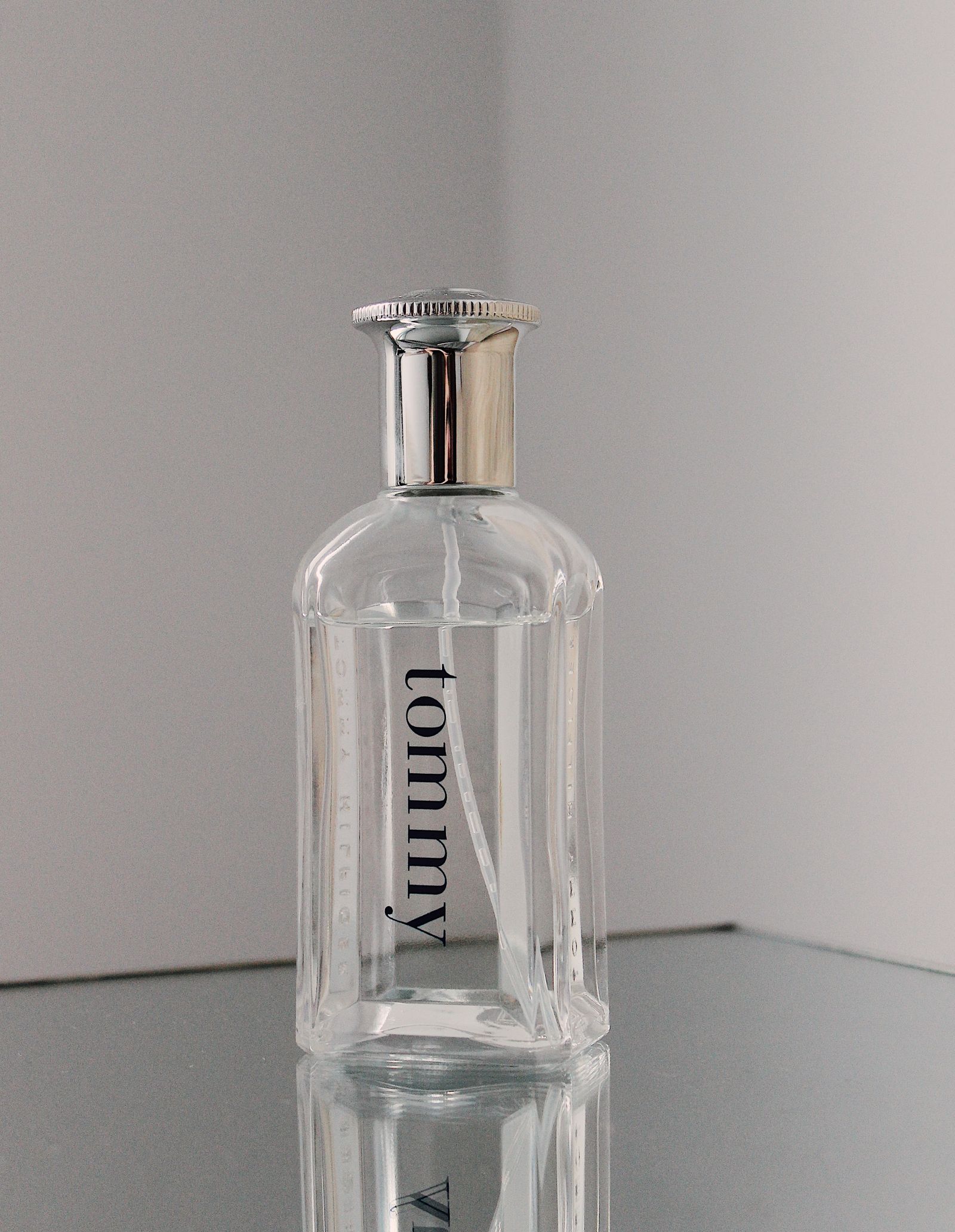
Before editing, we noted five things to check: the bottle silhouette, cap shape, label lettering, liquid level and dip tube. The gray background and mirrored surface were the parts we wanted to replace.
What we tested
On September 9, 2026, we made three authenticated requests to the generation service used by Toono AI's Image Generation workspace. This was the general image-generation feature, not the separate Product Packshot app.
Every request used the original photo, a square 1:1 canvas, 2K resolution and JPG output. We generated one image per prompt, with no retouching or cropping afterward. We didn't feed one result into the next request.
The actual prompts were written in Chinese. The English versions below are translations for readers to adapt, not prompts used to produce the pictured results. Expand each original to see exactly what was submitted. We haven't tested the translated versions.
Edit 1: a broad request produced unwanted ad copy
Turn this perfume photo into a premium ecommerce product image with a white background. Make it clear and attractive.Original Chinese prompt used for this result
把这张香水照片变成高级电商商品图,白色背景,清晰好看。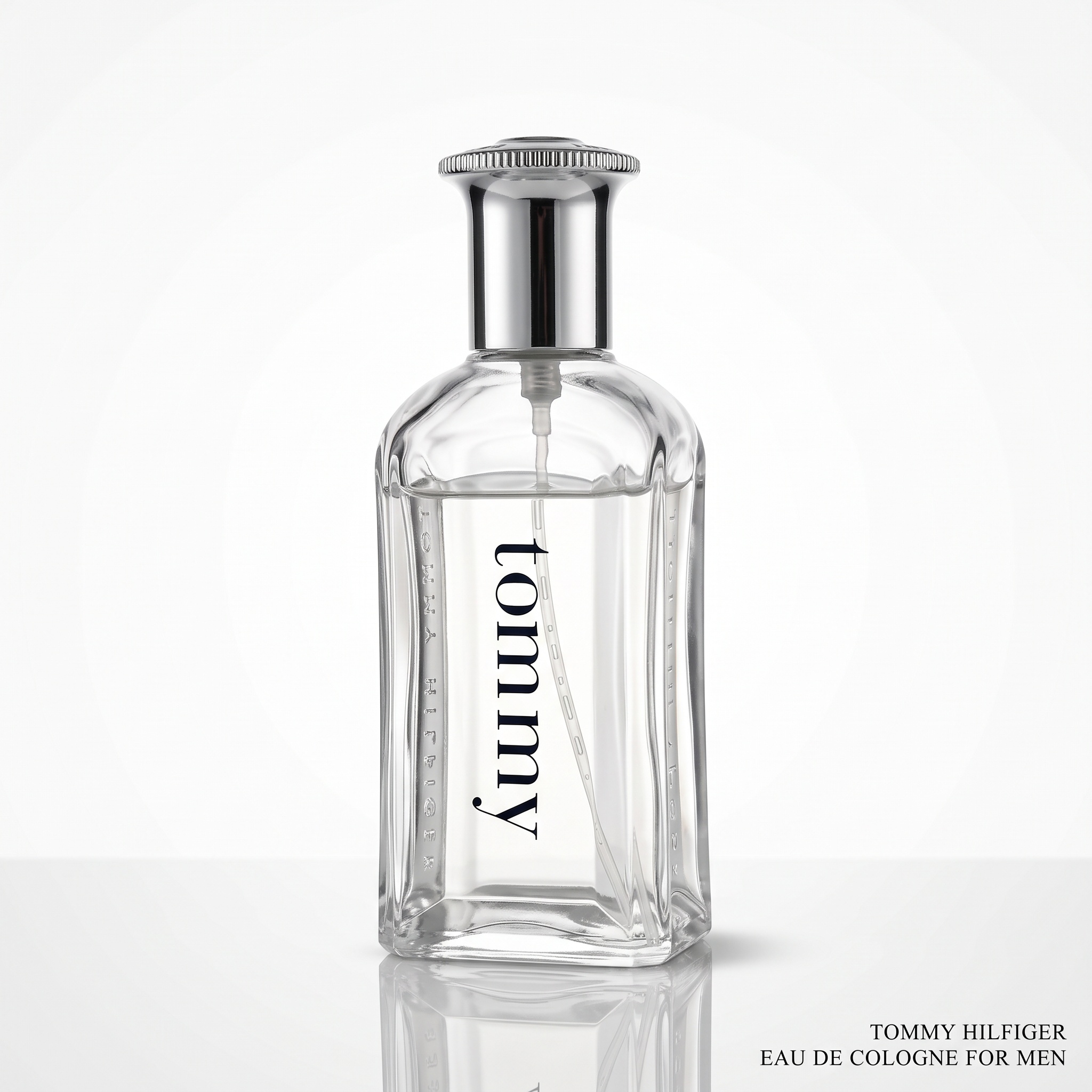
The bottle became brighter and the vertical lettering remained readable. But the image also acquired two lines of promotional copy outside the product, which weren't in the source. Those words cannot be treated as verified product information.
The mirror reflection remained, too. Asking for a white background hadn't explained that we wanted a different surface underneath the bottle.
There were subtler changes around the cap's internal fitting and the small side engravings. Sharper-looking detail isn't evidence that the detail is accurate. We kept the entire output visible here rather than cropping away the unwanted copy.
Edit 2: tighter instructions cleaned the background, but lost letters
Use the uploaded photo as the only product reference. Keep the same clear perfume bottle, silver cap, shoulder and base outlines, liquid level, internal dip tube, and the spelling, direction and position of the vertical black tommy lettering. Do not rotate the product, change its proportions, add packaging or accessories, or turn unclear details into new text. Remove the gray background, mirrored tabletop and surface reflection. Use a seamless pure-white background. Center the complete bottle at about 80% of the image height, with only a soft contact shadow beneath it. Use soft, even studio lighting while retaining transparent glass and natural metal highlights. Do not add text, watermarks, decorative objects or borders.Original Chinese prompt used for this result
使用上传照片作为唯一商品参考。保持同一只透明香水瓶、银色瓶盖、瓶肩和瓶底轮廓、透明液体液位、内部吸管,以及瓶身竖排黑色tommy文字的拼写、方向和位置。不旋转、不改变商品比例、不新增包装或配件,不把模糊细节补成新文字。去掉原来的灰色背景、镜面桌面和桌面倒影。改成纯白无缝背景,瓶子居中、完整可见,占画面高度约80%,仅在底部保留柔和接触阴影。使用柔和均匀的棚拍光,保留玻璃透明感和自然金属高光。不要增加文字、水印、装饰物或边框。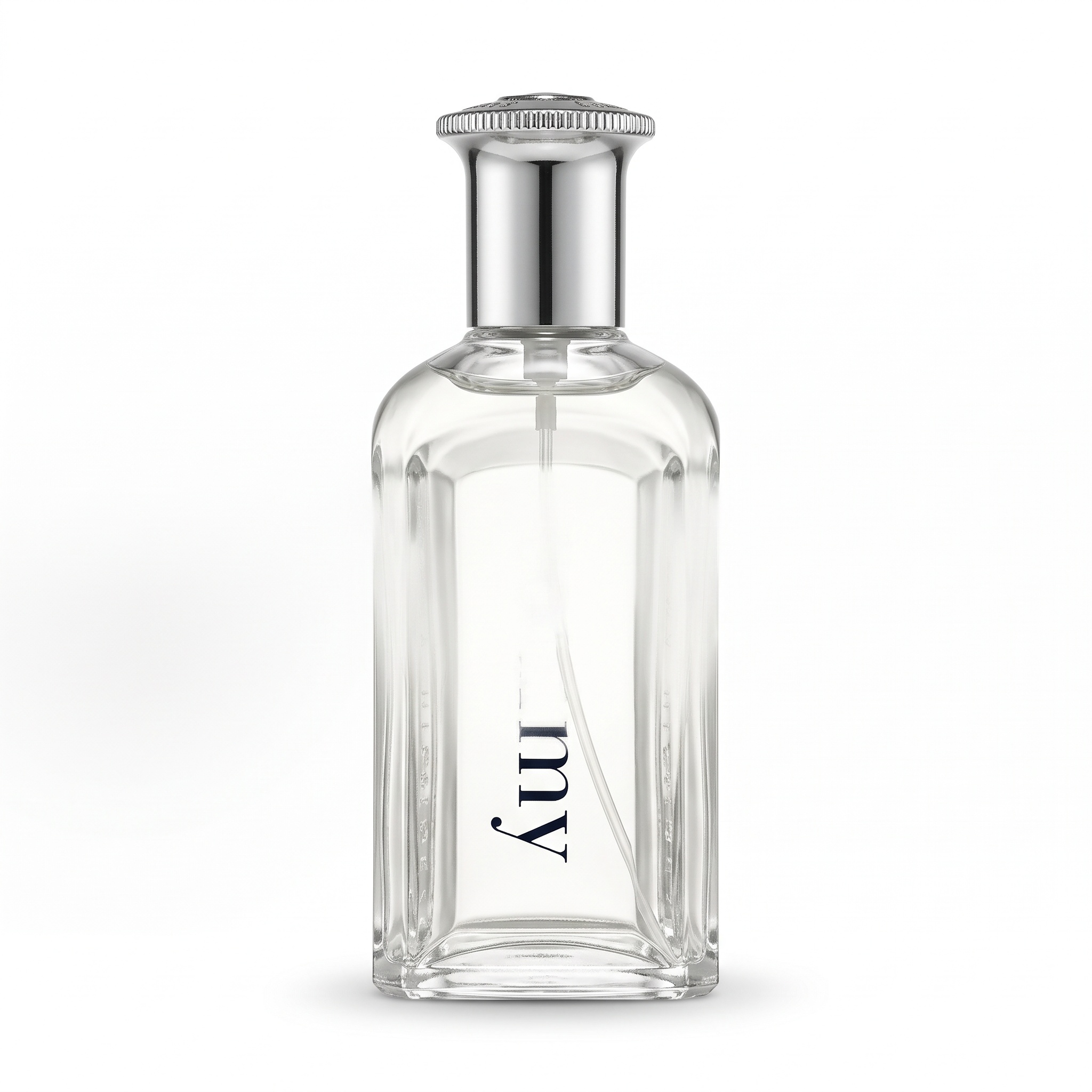
The background now looked closer to the brief: no mirrored surface and no added ad copy. Yet the label had a more serious problem. The upper part of “tommy” was missing; only the ending remained clearly visible.
The bottle's interior was much brighter, the liquid boundary was less clear, and the structure below the cap had changed. We would reject this version for an accurate product listing. A longer prompt addressed some problems while introducing another one that mattered more.
Edit 3: a usable visual direction still needs product review
Use the uploaded photo as the only product reference. Keep the same clear perfume bottle, silver cap, shoulder and base outlines, liquid level, internal dip tube, and the spelling, direction and position of the vertical black tommy lettering. Do not rotate the product, change its proportions, add packaging or accessories, or turn unclear details into new text. Change the background to a warm beige, minimal studio setting. Put the bottle on a matte pale-beige surface with soft natural side light, subtle tonal variation in the background and a natural contact shadow. Remove the original mirror reflection. Keep the complete product centered at about 75% of the image height. No plants, flowers, props, added text, watermarks or borders.Original Chinese prompt used for this result
使用上传照片作为唯一商品参考。保持同一只透明香水瓶、银色瓶盖、瓶肩和瓶底轮廓、透明液体液位、内部吸管,以及瓶身竖排黑色tommy文字的拼写、方向和位置。不旋转、不改变商品比例、不新增包装或配件,不把模糊细节补成新文字。把背景改成温暖米色的极简摄影棚,瓶子放在哑光浅米色台面上。侧面柔和自然光,背景有轻微明暗层次,保留自然接触阴影,去掉原图镜面倒影。商品完整可见,居中,占画面高度约75%。不加植物、花朵、道具、文字、水印或边框。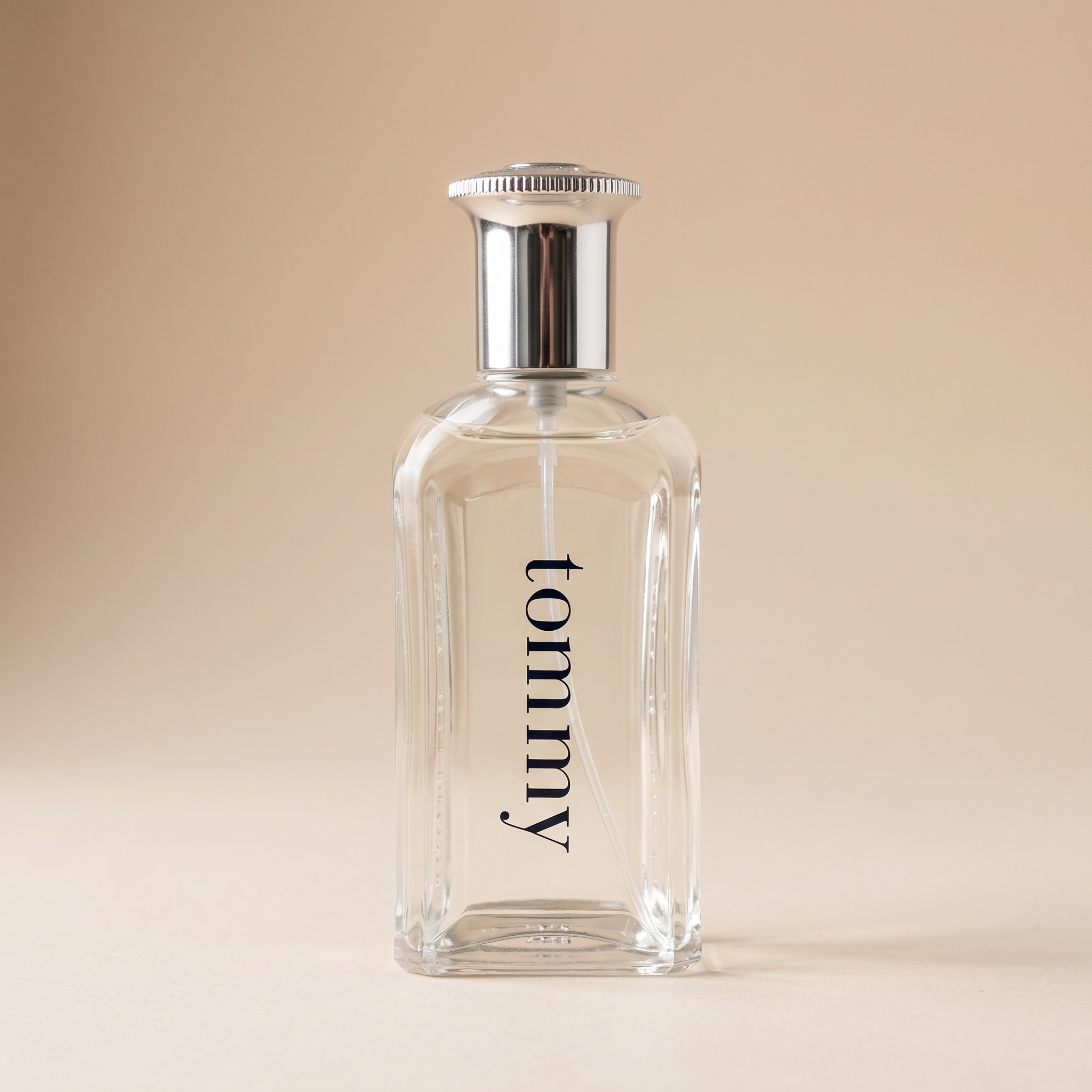
This result delivered the warm background, matte surface and soft shadow. The vertical label was readable and no outside copy or decorative props appeared.
It was a better match for the promotional direction. It still wasn't proof of exact product preservation: the tube connection and the area below the cap were reinterpreted, and the liquid boundary was less distinct than in the source. Treat it as a direction to review, not an automatically approved product image.
Time and credits: the full record
| Request | Time to result | Credits | Main finding |
|---|---|---|---|
| Broad white-background brief | 149.3 seconds | 12 | Added copy; mirror reflection retained |
| Constrained white-background brief | 135.2 seconds | 12 | Cleaner background; part of label missing |
| Beige studio brief | 144.1 seconds | 12 | Scene achieved; internal details need review |
Total: 36 credits for three returned images. A completed generation isn't the same as an image that passes product review. The timings include submission, waiting, polling and saving the result, but exclude source upload and editorial asset archiving. They are not model-only processing benchmarks.
These are the settings and charges for this test. Available settings and current charges are shown in the workspace. We haven't converted credits into a fixed cash price because the cost per credit depends on the purchase plan.
One sample per prompt, without a fixed seed, cannot establish an error rate or prove that longer prompts always perform better.
Try it with your own photo
- Open Image Generation in Toono AI and sign in.
- Upload one clear reference photo. Keep the full product in frame and make sure important lettering is legible.
- Describe what must stay unchanged, then describe the background and lighting you want. Use one of the translated briefs above as a starting point, with your own product details.
- Check the available output settings and the credit charge before generating. Our recorded setup was 1:1, 2K and JPG; current defaults may differ.
- Compare the result with your original before publishing. For another independent attempt, start from the original again.
If you only need a white background, the dedicated Product Packshot app is another option. It wasn't the feature used for the three images above.
Before an edit goes live
Read every letter on the label, compare the cap and bottle proportions, and inspect transparent areas at a useful zoom level. Look for invented accessories, sharper but unsupported markings, changed liquid levels and implausible shadows.
If the product itself keeps changing, try a clearer source photograph. Where exact detail is essential, a cutout-and-composite workflow that retains the original product pixels, or a new photograph, may be a better fit than regenerating the bottle.
A beige promotional image and a primary listing image serve different purposes. Check the requirements of your own sales channel; this experiment did not test compliance with any marketplace's image rules.
Ready to test a background? Try your product photo in Toono AI. Judge the result against the original product, not just against the visual style you had in mind.
Test conducted by Toono AI on September 9, 2026. The outputs are AI-edited images, not photographs of new physical sets. No sales-lift claim is made.